Designer Review · Diagram Slate

Cyber-Physical

A Security Integrator's Guide to Network Risk

This is the current diagram slate for Cyber-Physical — eighteen figures distributed across six parts and two appendices, each accompanied by a short overview of what the figure shows and why it earns its page. The book is a ~300-page trade title for security integrators: practitioners who install cameras, access control, and alarm panels and who are now being asked to take responsibility for the network those systems live on.

What we're looking for from the designer: typographic refinement, visual hierarchy, and consistency of voice across the eighteen figures as a set. Every figure must work in two production paths simultaneously — full color in the EPUB and PDF editions, monochrome-legible in the B&W print interior — so color should reinforce information that is also encoded by position, weight, or shape.

Book & Figure Specifications

Delivery Formats
Print (B&W interior, full-color cover) · EPUB (full color) · PDF (full color)
Print Trim
7" × 10" · 0.125" bleed · matte laminate cover · ~300 pp
Color Constraint
Figures must read correctly in monochrome (print) and color (ebook). Use position, weight, pattern, or label as the primary encoding; color reinforces.
Body Typography
Charter 10.5pt justified (body) · Menlo (code) · Helvetica Neue (diagram labels)
Palette
#224D6B navy (primary) · #D4A843 gold (warning) · #C94545 red (danger) · #5A8A5A green (safe) · #7B5EA7 purple (SOC) · #969696 gray (de-emphasized)
Source Toolchain
CeTZ (Typst-native, .typ files) for most production figures · D2 (.d2 + rendered .svg) for flowcharts with complex container layouts · Pipeline: typst compile --ppi 300 or d2 --layout elk
Raster Export
300 PPI PNG from source · SVG available for D2-sourced figures
Scope
18 figures: 4 in Part I · 3 in Part II · 4 in Part III · 1 in Part IV · 3 in Part V · 1 in Part VI · 2 in Appendix B
Part I
The Convergence Problem
Figure 1.1 Chapter 1 · Every Device Is a Computer

Flat Network vs. Segmented Network
Flat Network vs. Segmented Network

What It Shows

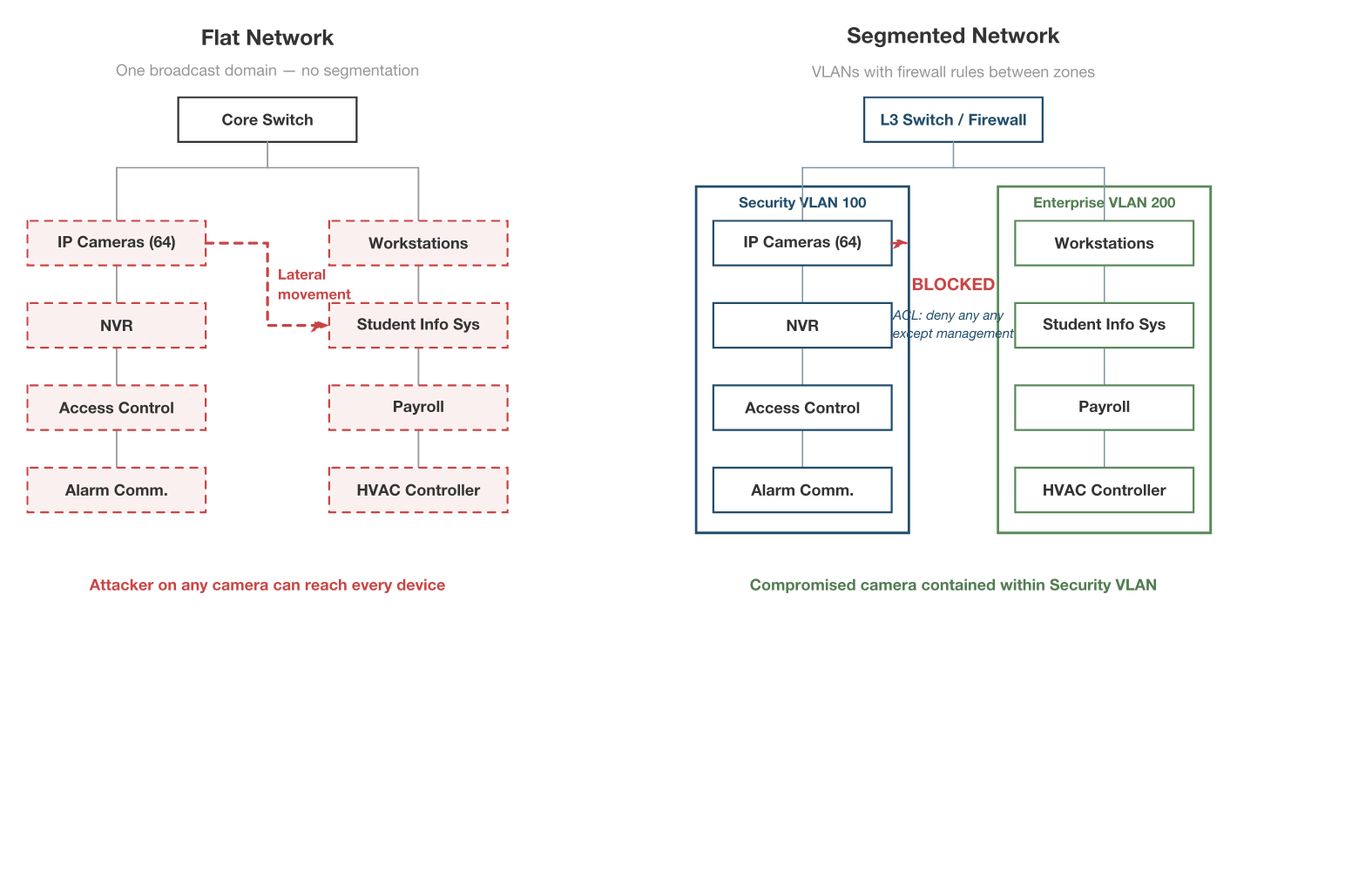
A side-by-side comparison: on the left, forty-eight cameras, an access control controller, and a district's student information system all sharing one subnet. On the right, the same devices placed on isolated VLANs with explicit firewall ACLs blocking lateral movement between zones.

Why It's Here

This is the foundational image of the book. Integrators need to see — in one glance — that "it works" (flat) and "it's safe" (segmented) are not the same thing. The figure anchors every later discussion of VLANs, ACLs, and trust boundaries.
Source ch01-flat-vs-segmented.png300 PPI raster ch01-flat-vs-segmented.typCeTZ / Typst source
Figure 2.1 Chapter 2 · Who Owns the Risk

The Insurance Gap

The Insurance Gap

What It Shows

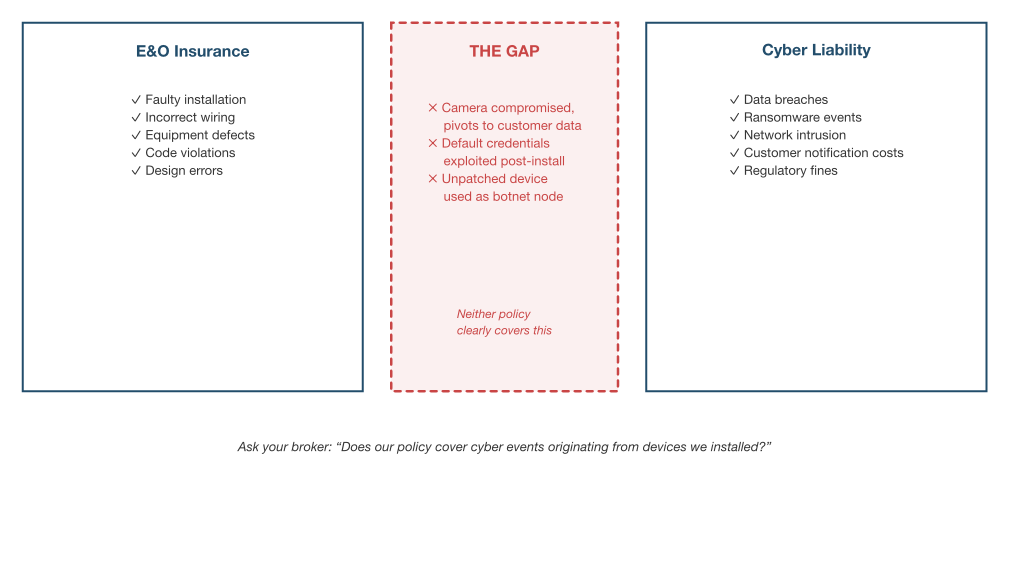
Two overlapping coverage zones — Errors & Omissions on one side, Cyber Liability on the other — with a visible gap between them. A ransomware event that entered through a camera lands squarely in that gap: not quite professional negligence, not quite a data breach, but exposing the integrator either way.

Why It's Here

Most integrators assume their E&O policy covers cyber incidents. It usually doesn't. This figure makes the coverage gap visible in a way a paragraph of policy language cannot, and gives the reader a concrete image to carry into conversations with their insurance broker.

Source ch02-insurance-gap.png300 PPI raster ch02-insurance-gap.typCeTZ / Typst source
Figure 2.2 Chapter 2 · Who Owns the Risk

The Liability Chain

The Liability Chain

What It Shows

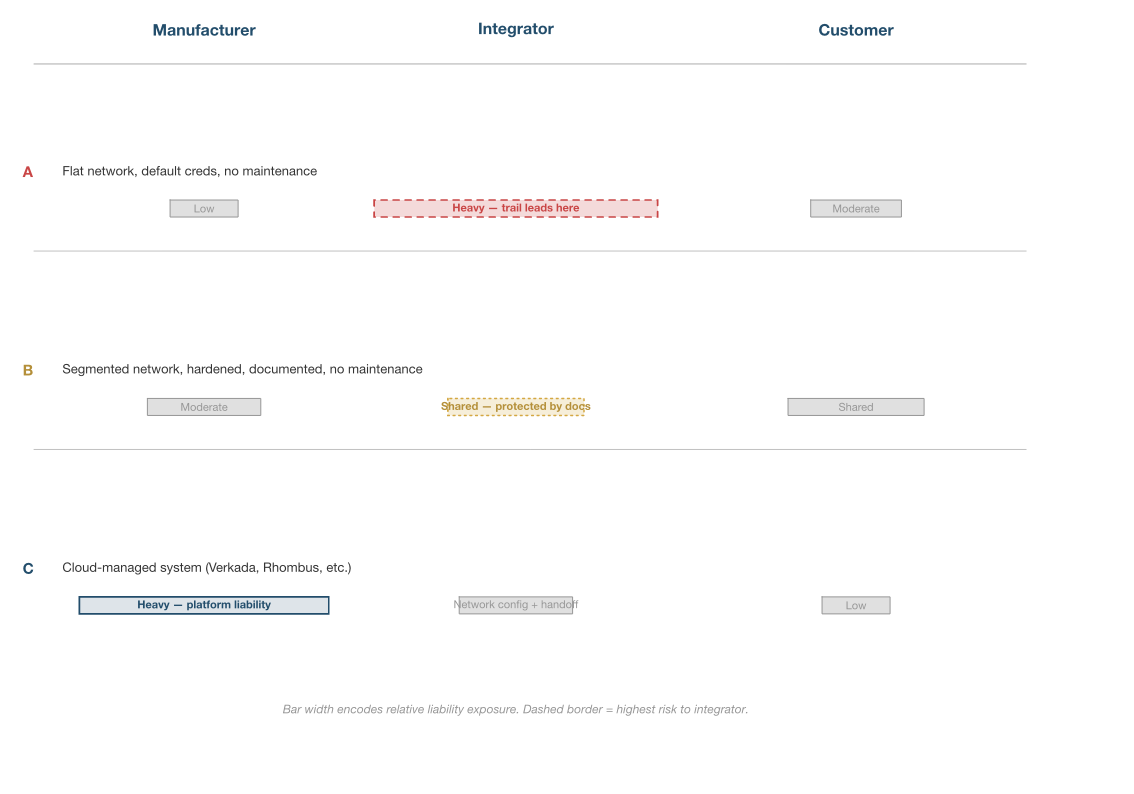
Three contracting scenarios — manufacturer-direct, integrator-as-prime, and integrator-as-subcontractor — each showing how liability exposure shifts depending on who signs what. Risk travels along the chain in proportion to who the customer believes is responsible.

Why It's Here

Integrators rarely think of themselves as the responsible party when a device fails. Their customer does. The figure makes that asymmetry concrete and sets up Appendix D's statement-of-work language, which is the practical response.

Source ch02-liability-chain.png300 PPI raster ch02-liability-chain.typCeTZ / Typst source
Figure 3.1 Chapter 3 · The Integrator's Attack Surface

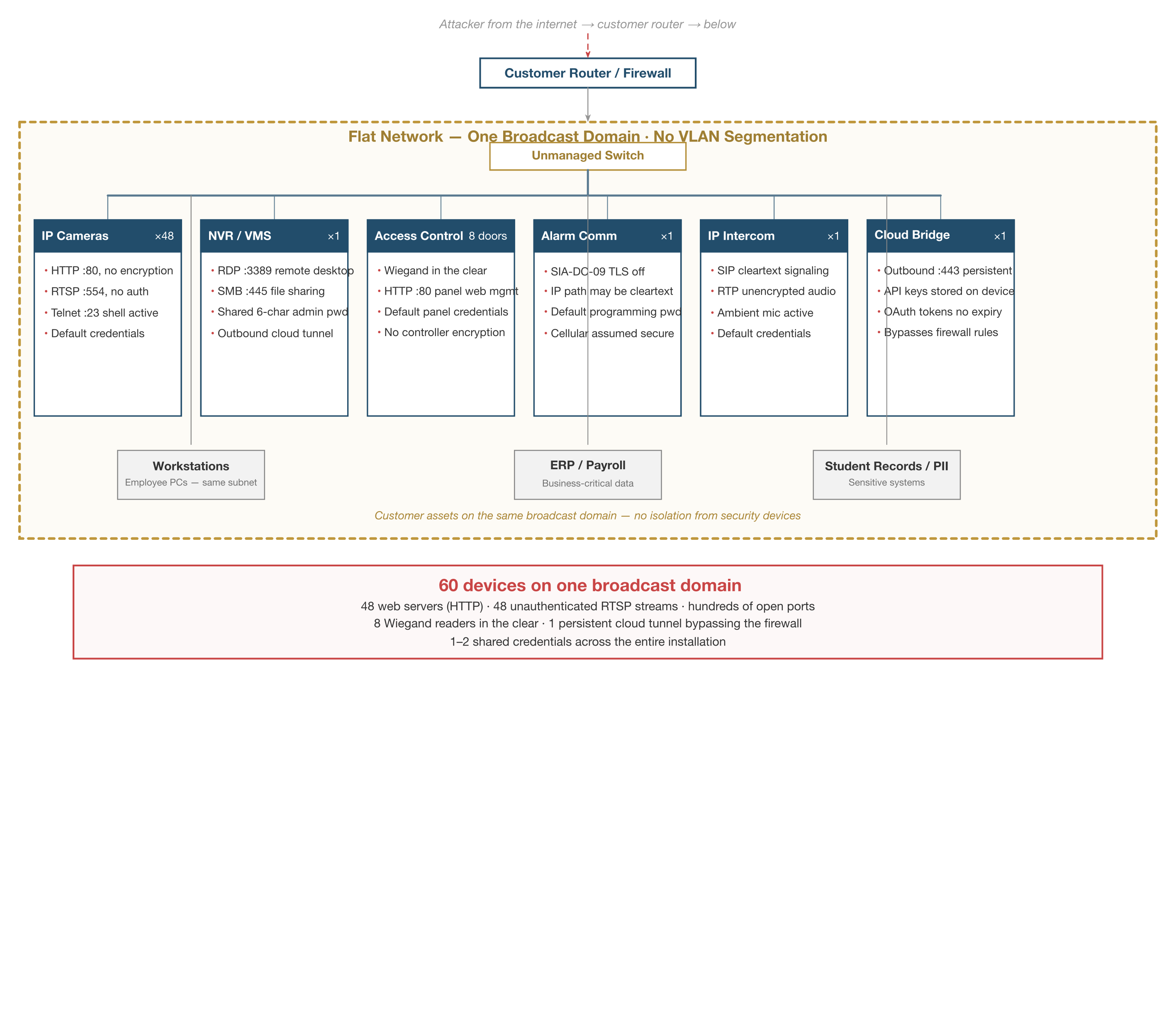
Attack Surface Map

Attack Surface Map

What It Shows

A typical mid-market deployment — forty-eight cameras, an eight-door access control head-end, a cellular alarm communicator, an intercom, and a VMS server — cataloged as categories of devices with four exposure items each (open ports, default credentials, firmware state, protocol weaknesses). The whole surface sits inside a flat-network boundary that also contains the customer's workstations, ERP system, and student records.

Why It's Here

This is the baseline the reader is asked to defend. Before hardening guidance lands in Part III, the reader needs a single image of what "the attack surface" actually means in their world — not in the abstract, but in the equipment they installed last month.

Source ch03-attack-surface-map.png300 PPI raster ch03-attack-surface-map.typCeTZ / Typst source
Part II
How Attacks Actually Work
Figure 5.1 Chapter 5 · Case Studies

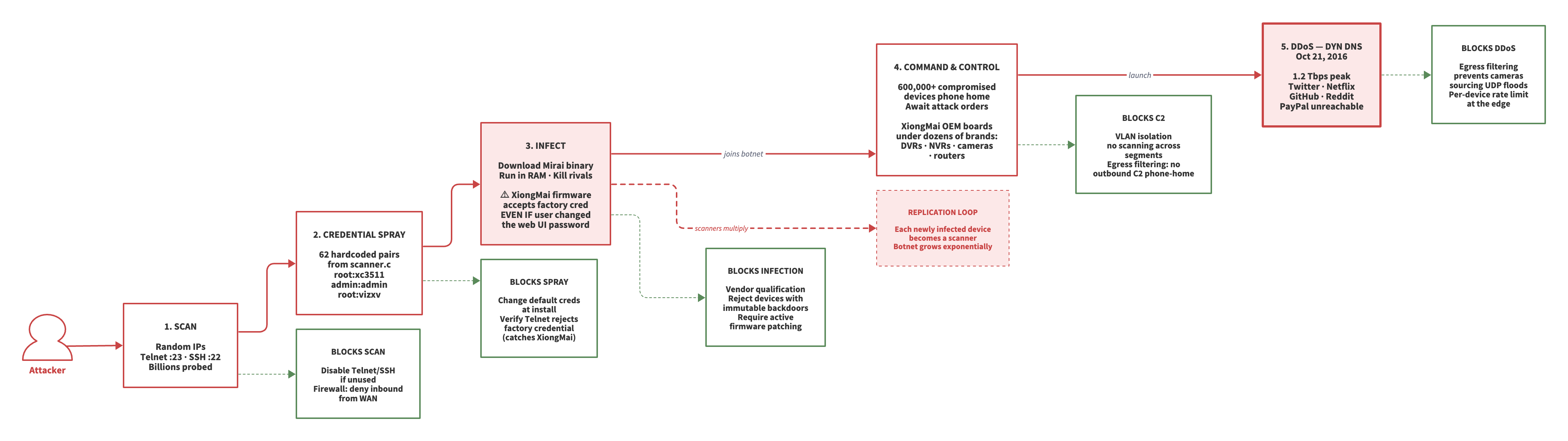
Mirai Botnet Attack Flow

Mirai Botnet Attack Flow

What It Shows

Five phases of the 2016 Mirai botnet rendered in horizontal flow: scan, credential spray, infect, command-and-control, DDoS. Beneath each phase, the single defender-side control that would have blocked it. A replication-loop callout sits alongside the main flow, showing how each compromised device became a scanner for the next.

Why It's Here

Mirai is the origin story for IoT botnets, and specifically for integrators: the vulnerable devices were XiongMai OEM boards shipped inside dozens of recognizable brand-name DVRs. The figure lets the reader see how a default password at install-time became a Dyn outage, with defender controls paired phase-for-phase.

Figure 5.2 Chapter 5 · Case Studies

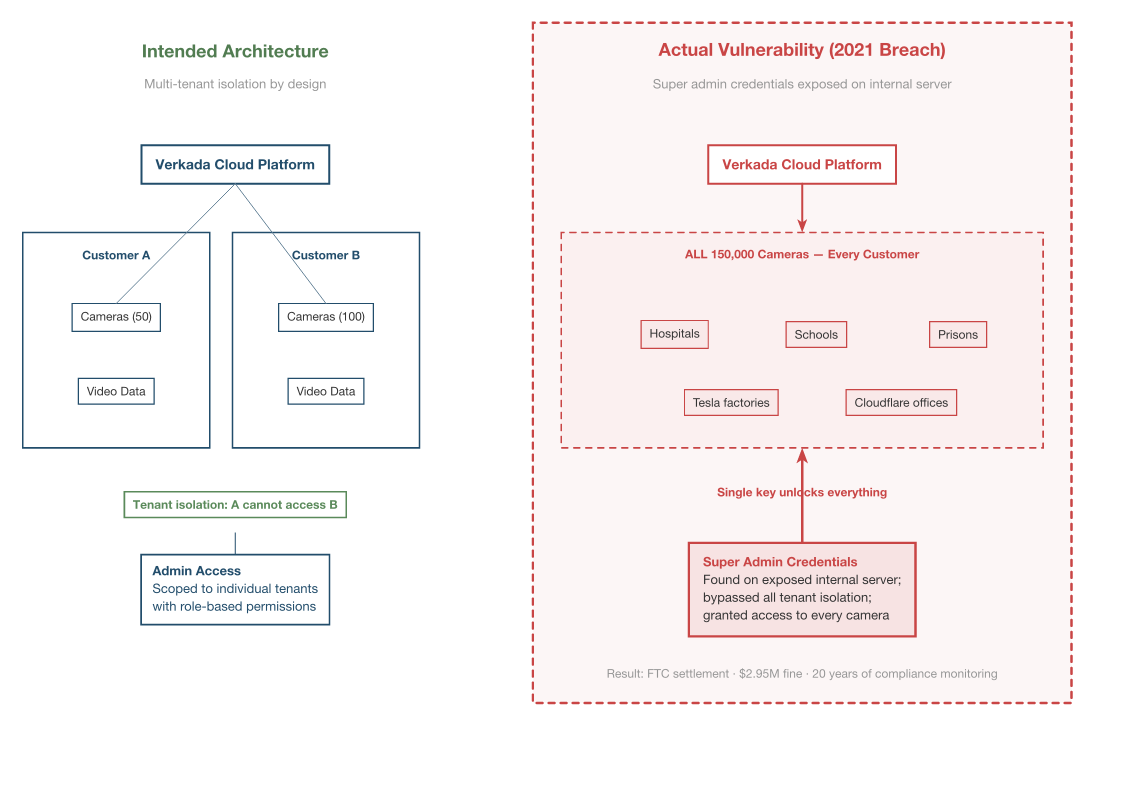
Verkada Cloud Architecture Breach

Verkada Cloud Architecture Breach

What It Shows

The architectural difference between a traditional on-premise NVR compromise (affecting one customer) and a cloud-platform compromise (affecting every customer simultaneously). One Super Admin credential at Verkada unlocked 150,000 cameras across schools, jails, and Tesla.

Why It's Here

Integrators are moving customers to cloud video for good operational reasons. This figure forces a conversation about blast radius: cloud architecture changes the unit of failure from "this customer" to "every customer of this vendor." That's a trade worth making — but it's worth making with eyes open.

Source ch05-verkada-architecture.png300 PPI raster ch05-verkada-architecture.typCeTZ / Typst source
Figure 5.3 Chapter 5 · Case Studies

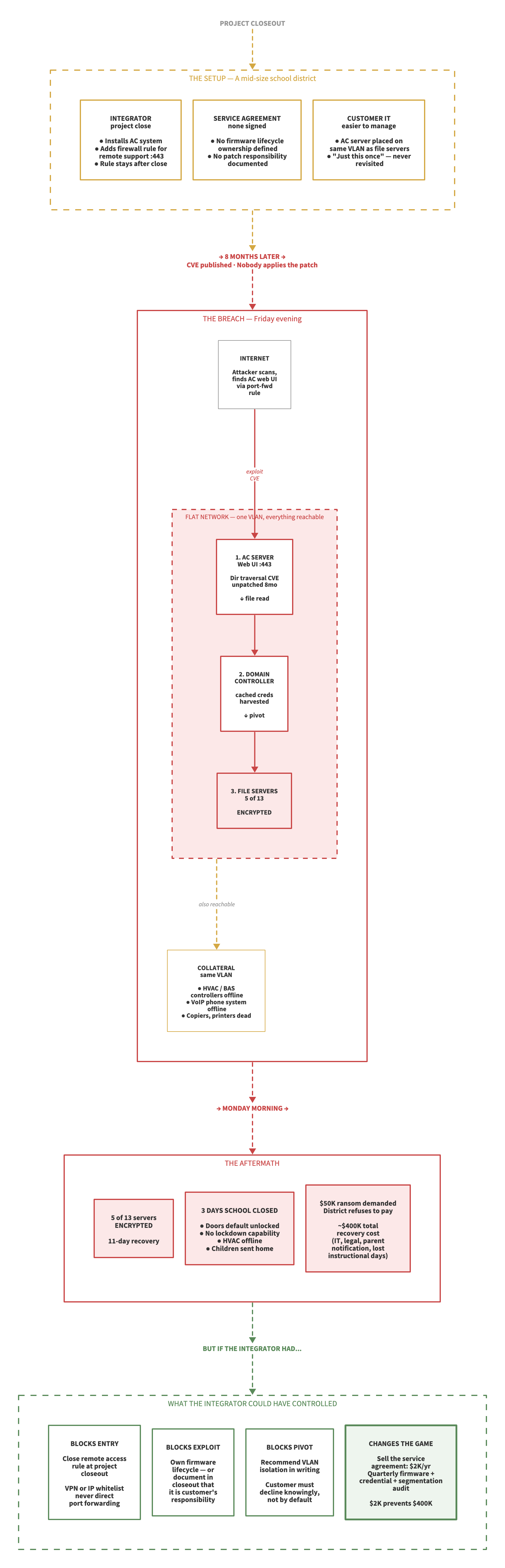
School District Ransomware Attack Path

School District Ransomware Attack Path

What It Shows

A four-phase timeline — Setup, Breach, Aftermath, Controls — with time markers between phases ("8 months later," "Monday morning"). An exposed HVAC/access-control web interface led to credential harvesting, lateral movement, encryption of five servers, and recovery costs approaching $400,000. The final panel shows the specific integrator-owned controls that would have broken the chain.

Why It's Here

The school district case is the most representative incident in the book. It's not a headline-grade breach — it's the ordinary failure that happens somewhere every week. Showing it as a four-phase sequence with explicit "but if the integrator had..." controls makes the defensible moments concrete.

Part III
Hardening Practices
Figure 7.1 Chapter 7 · Network Architecture

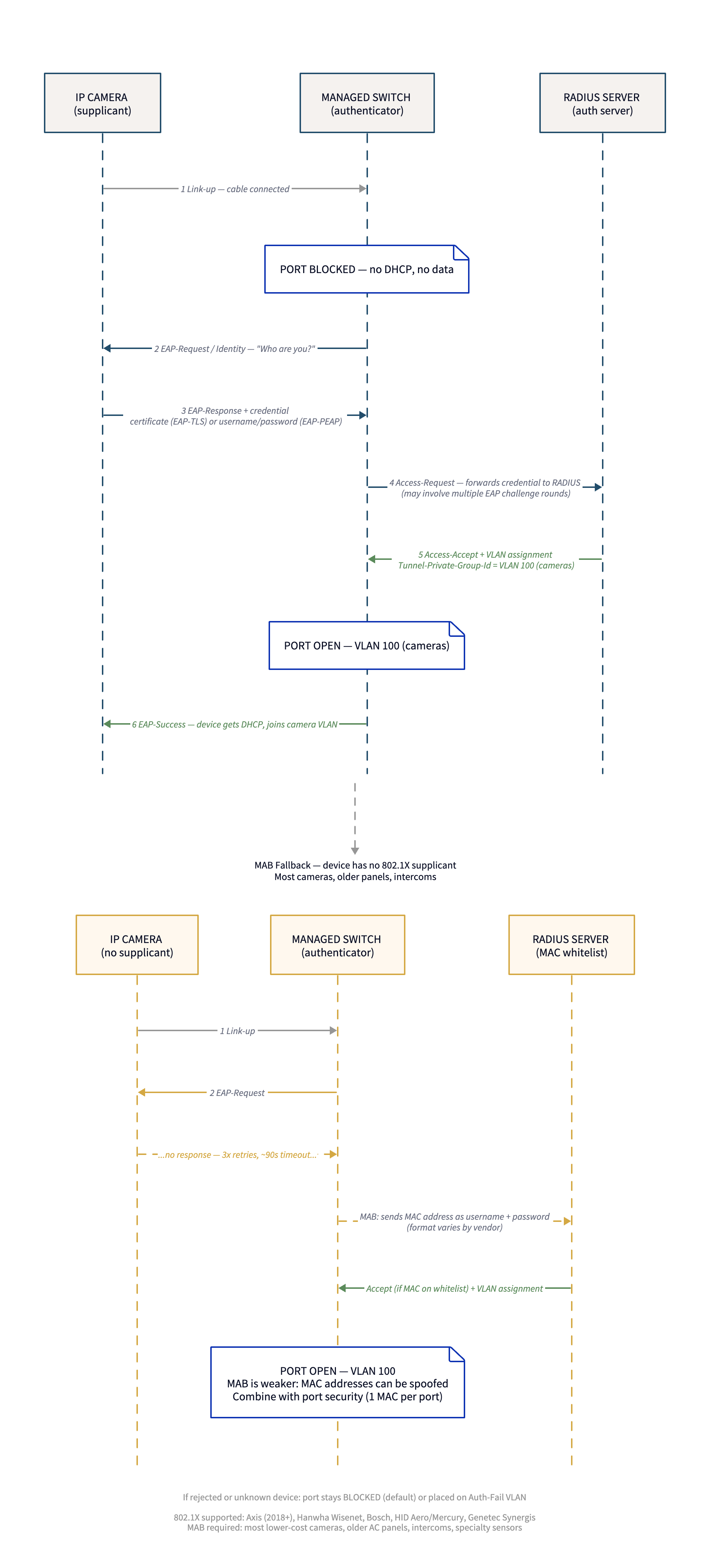
802.1X Authentication Flow

802.1X Authentication Flow

What It Shows

The three-party handshake among supplicant (the device being plugged in), authenticator (the switch port), and RADIUS server — with the switch port held in a dead state until authentication succeeds. Dynamic VLAN assignment returns from the RADIUS server as part of the successful reply.

Why It's Here

Integrators who have never worked with 802.1X often imagine it as "the switch checks a password." The figure corrects that mental model: the switch is a relay, the RADIUS server is the brain, and the VLAN assignment is a consequence of identity, not geography. This is the reference every reader will come back to.

Source ch07-802-1x-flow.png300 PPI raster ch07-802-1x-flow.d2D2 source ch07-802-1x-flow.svgvector export
Figure 9.1 Chapter 9 · Credential Management

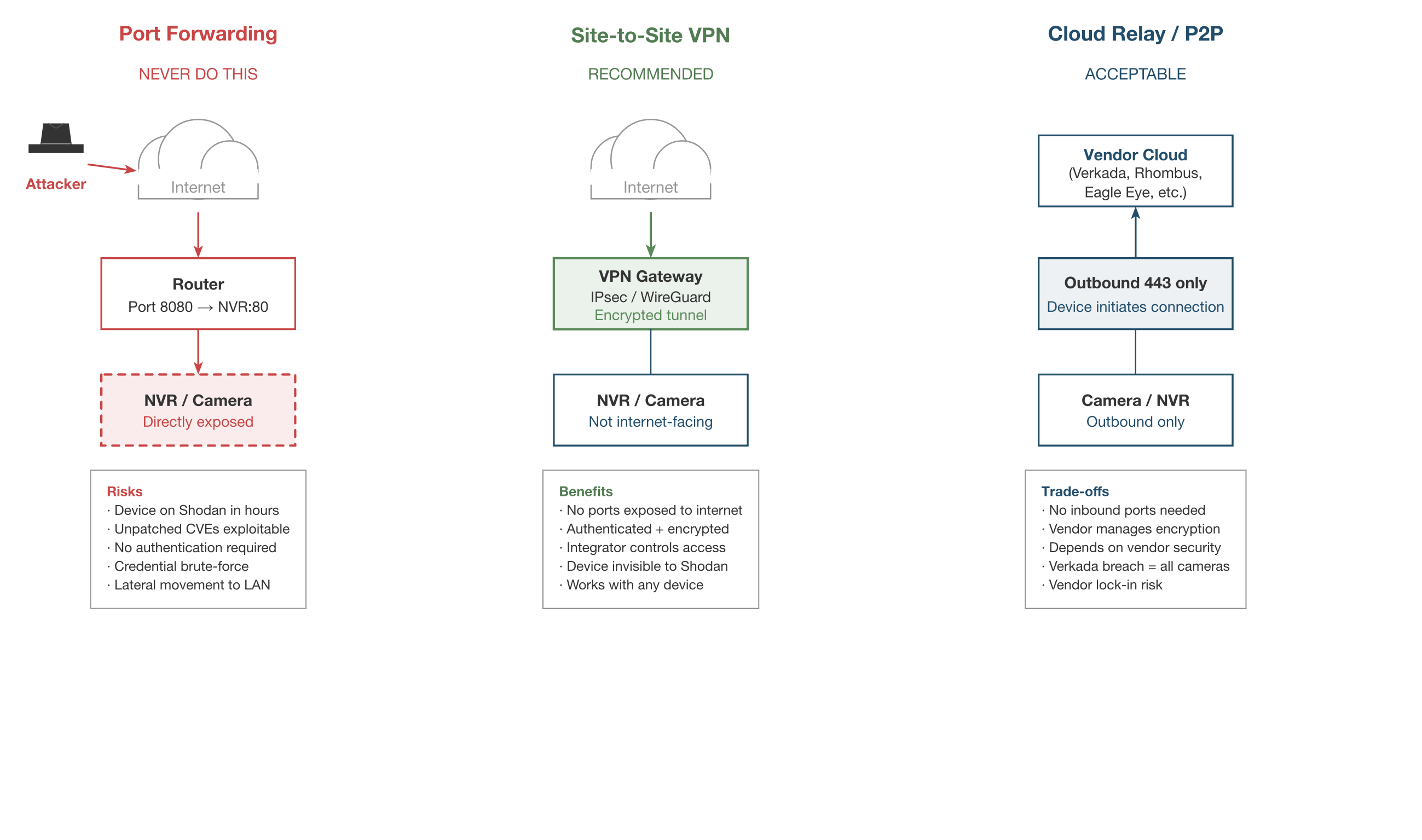
Remote Access Comparison

Remote Access Comparison

What It Shows

Three approaches to remote device management compared on one page: port forwarding (device reachable from the public internet), VPN (authenticated tunnel into the customer network), and cloud relay (outbound-only connection to a vendor's cloud broker). Each is annotated with what's exposed and to whom.

Why It's Here

"How do I get into the site remotely?" is the most common question in integrator service departments. The answer that most field techs grew up with — port forwarding — is the answer that's actively getting customers compromised. This figure is the replacement decision aid.

Figure 10.1 Chapter 10 · Patch Management

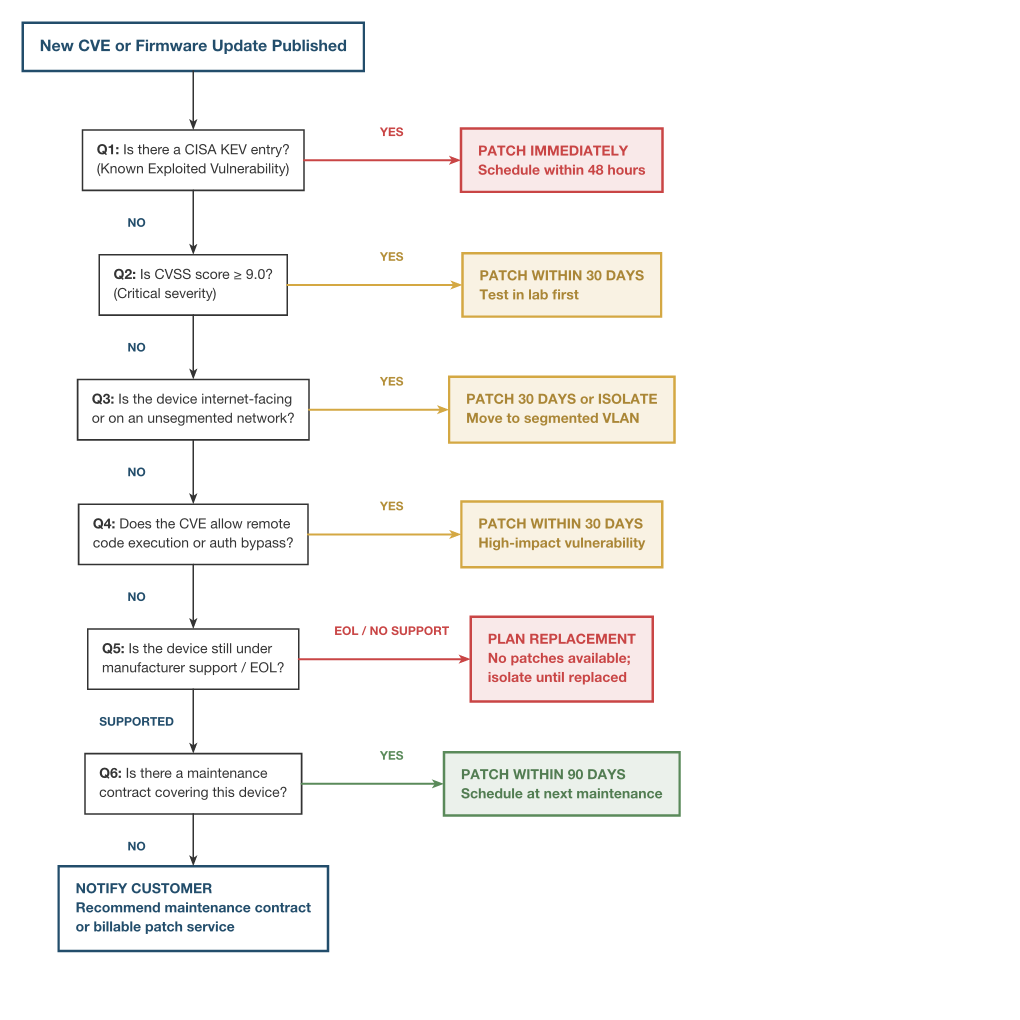
Firmware Triage Decision Flowchart

Firmware Triage Decision Flowchart

What It Shows

A six-question decision tree for triaging a newly disclosed firmware vulnerability: Is it on CISA's Known Exploited Vulnerabilities list? What's the CVSS score? Is the device internet-facing? Is the exploit a pre-auth RCE? Is the device EOL? Is it under a maintenance contract? Each path terminates in a concrete patch-window recommendation.

Why It's Here

Patch-management guidance in the IT world assumes a change-advisory board and a test environment. Integrators have neither. This flowchart is a field-grade replacement: a single printed page the service manager can work from when the vendor advisory lands at 9 p.m. on a Friday.

Source ch10-firmware-triage.png300 PPI raster ch10-firmware-triage.typCeTZ / Typst source
Figure 10.2 Chapter 10 · Patch Management

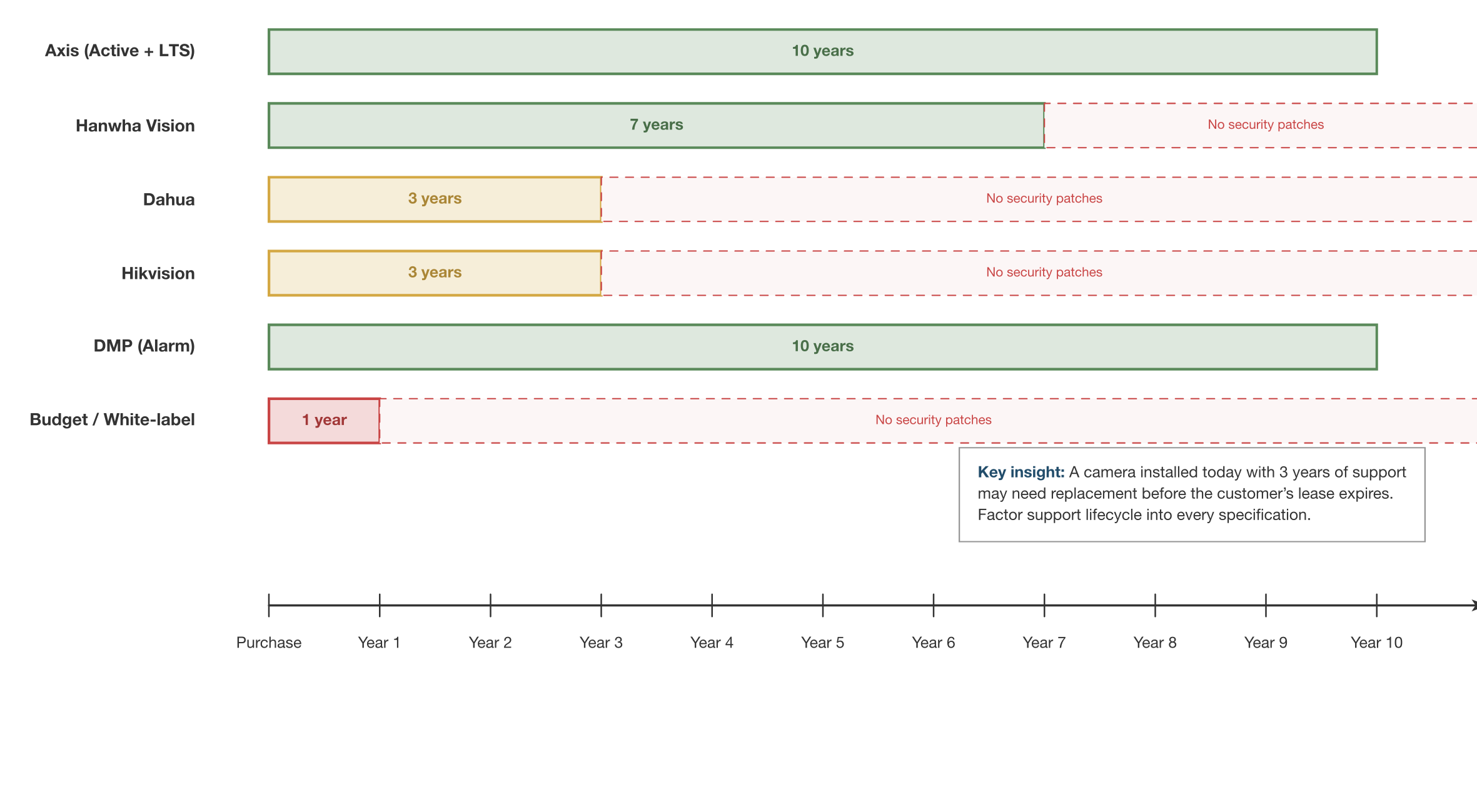
Manufacturer Firmware Lifecycle

Manufacturer Firmware Lifecycle

What It Shows

A visual comparison of how long major physical-security manufacturers support firmware after a product ships — from "security patches for the life of the product" at the best end to "no post-sale patches at all" at the worst end. Each vendor's published lifecycle policy is represented as a bar along a shared timeline.

Why It's Here

Support windows are buried in datasheets nobody reads at the time of purchase. When the integrator is three years into a deployment and a CVE lands, the relevant question is whether the manufacturer is still issuing patches for that SKU. This figure is the before-you-spec-it reference that prevents that conversation from happening the hard way.

Source ch10-manufacturer-lifecycle.png300 PPI raster ch10-manufacturer-lifecycle.typCeTZ / Typst source
Part IV
The Quantum Horizon
Figure 12.1 Chapter 12 · Post-Quantum Cryptography

Post-Quantum Cryptography Timeline

Post-Quantum Cryptography Timeline

What It Shows

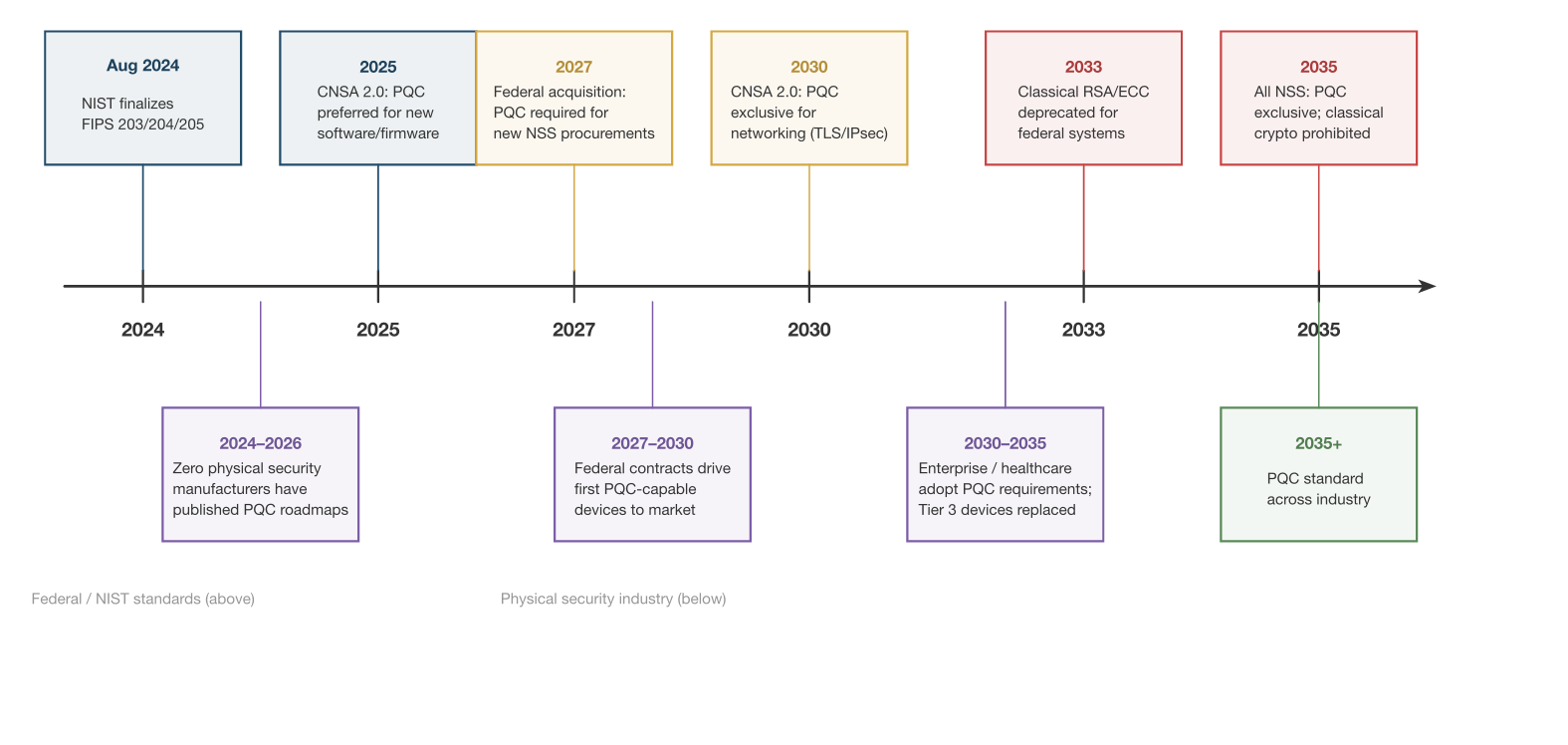
A horizontal timeline of PQC milestones relevant to integrators: NIST's standards publication, federal deprecation deadlines for legacy algorithms, CNSA 2.0 transition requirements, and the practical window when integrators can expect PQC-capable firmware from major manufacturers.

Why It's Here

The PQC transition is ten years long but the "harvest now, decrypt later" threat is immediate. The timeline reframes a topic that reads as distant research as something with concrete dates already on the calendar — dates that will arrive during the service life of equipment being installed this quarter.

Source ch12-pqc-timeline.png300 PPI raster ch12-pqc-timeline.typCeTZ / Typst source
Part V
Building a Cybersecurity Practice
Figure 14.1 Chapter 14 · Cost Center to Revenue

Security Service Tier Comparison

Security Service Tier Comparison

What It Shows

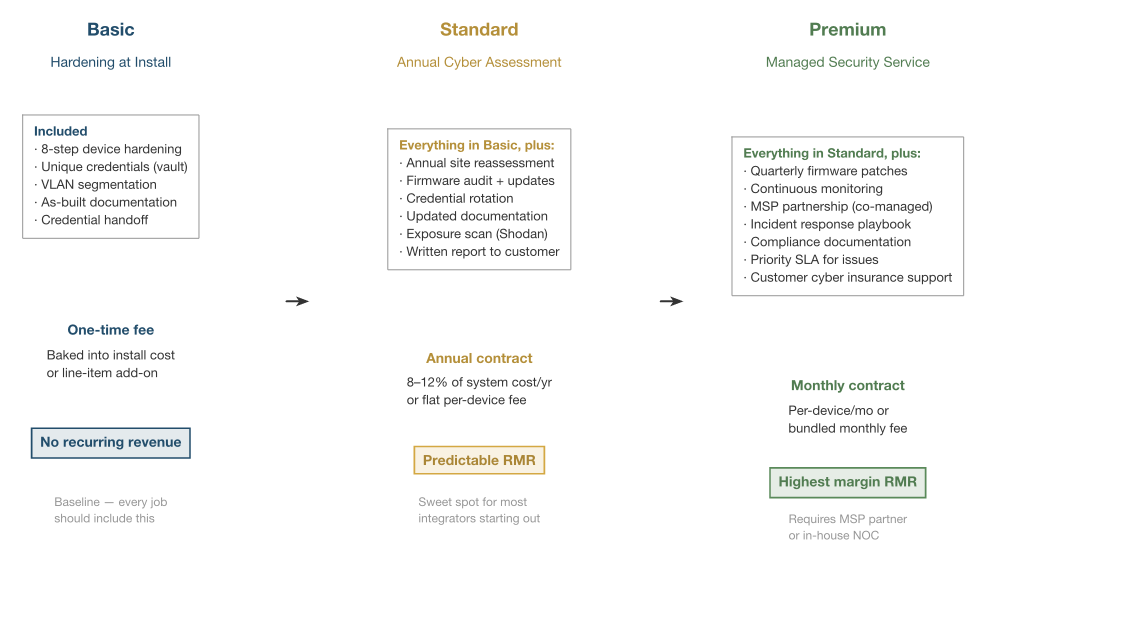
Three tiers of cybersecurity service offering — Basic, Standard, and Premium — rendered as stacked cards showing what's included at each level, the pricing model (flat fee vs. per-device vs. per-site), and which customer segments each tier serves.

Why It's Here

Part V's core argument is that cybersecurity is a recurring-revenue product, not a line item on the install invoice. The figure gives readers an anchor for their own service-design conversation — a starting point for their pricing sheet rather than a template to copy.

Source ch14-service-tiers.png300 PPI raster ch14-service-tiers.typCeTZ / Typst source
Figure 16.1 Chapter 16 · Documentation & Compliance

Compliance Framework Map

Compliance Framework Map

What It Shows

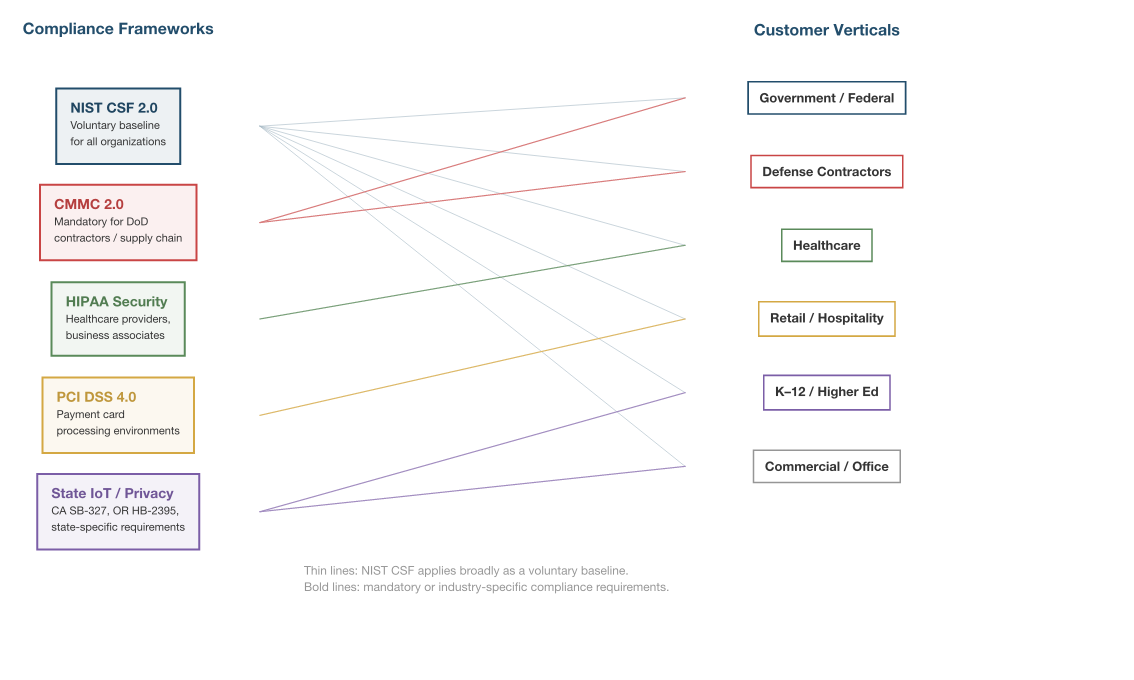
A matrix mapping the compliance frameworks an integrator is likely to encounter — NIST CSF, SOC 2, CMMC, state privacy laws (CCPA, etc.), and industry-specific rules (HIPAA, PCI, FERPA) — against the concrete integrator obligations each creates: logging, access review, incident notification, vendor attestation.

Why It's Here

Integrators encounter compliance as an inherited customer requirement, not a choice. This map lets them see which framework is driving which request, and — more usefully — which controls satisfy several frameworks at once. It's a prioritization aid for a reader under pressure.

Source ch16-compliance-map.png300 PPI raster ch16-compliance-map.typCeTZ / Typst source
Figure 16.2 Chapter 16 · Documentation & Compliance

Incident Response Process

Incident Response Process

What It Shows

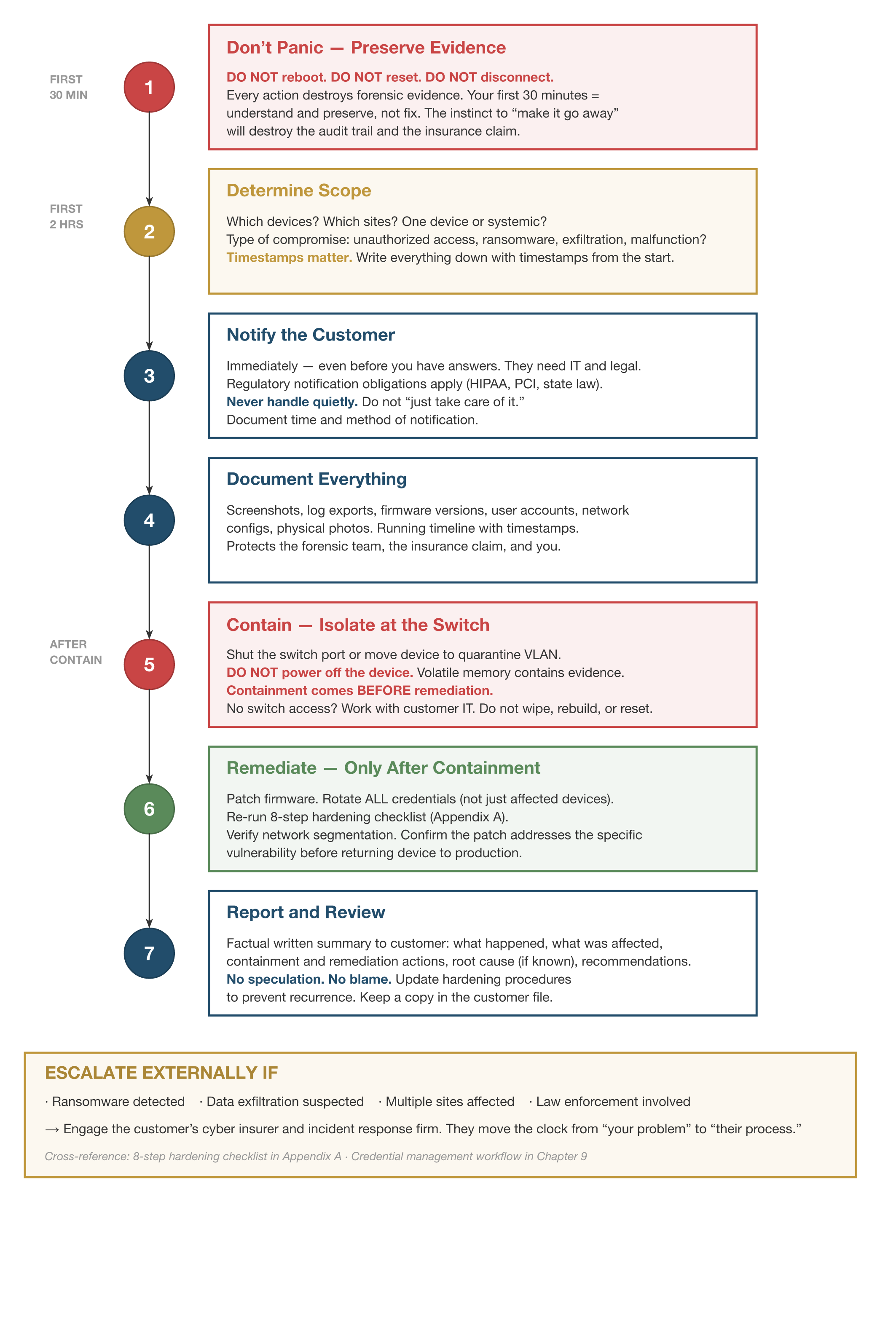
A seven-step incident response flow laid out with numbered step badges, time-cadence markers ("First 30 min," "First 2 hours," "After containment"), red-bordered "Do Not" warnings at each step, and a full-width "Escalate Externally If…" sidebar at the bottom. Built as a reference the service manager can read while an incident is in progress, not after.

Why It's Here

Incident response frameworks in the IT world are written for SOC analysts. Integrators need one written for a service manager with a phone in each hand. The figure is that version: prescriptive, time-boxed, and explicit about when to call the insurance carrier and counsel.

Source ch16-incident-response.png300 PPI raster ch16-incident-response.typCeTZ / Typst source
Part VI
Looking Forward
Figure 17.1 Chapter 17 · The Converged Security Operator

Regulatory Trajectory Timeline

Regulatory Trajectory Timeline

What It Shows

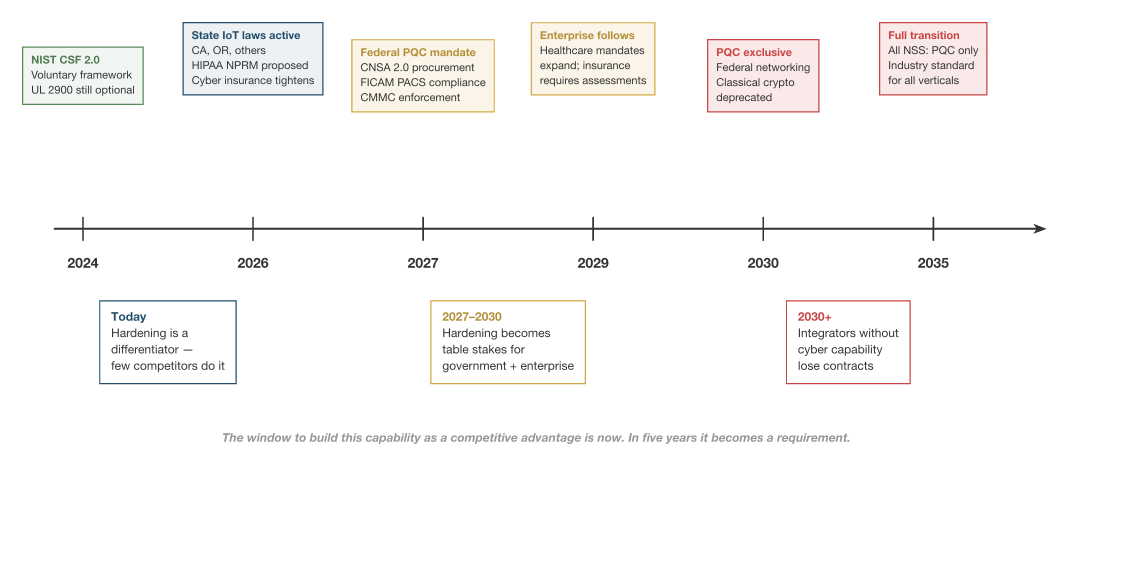
A timeline tracking the transition of cybersecurity requirements for physical security from voluntary best practices (IEC 62443, NIST CSF) through industry frameworks (SIA GDPR guidance, TMA standards) into enforceable regulation (state IoT laws, federal agency rules, insurance-driven mandates). Each milestone is a moment where "recommended" became "required."

Why It's Here

The book's closing argument is that integrators who invest in hardening now are not adopting an optional premium; they're getting ahead of a regulatory wave that's already moving. The timeline makes that wave visible — and dated.

Source ch17-regulatory-timeline.png300 PPI raster ch17-regulatory-timeline.typCeTZ / Typst source
Appendix B
Network Reference Diagrams
Figure B.1 Appendix B · Network Reference

Mid-Market Network Architecture

Mid-Market Network Architecture

What It Shows

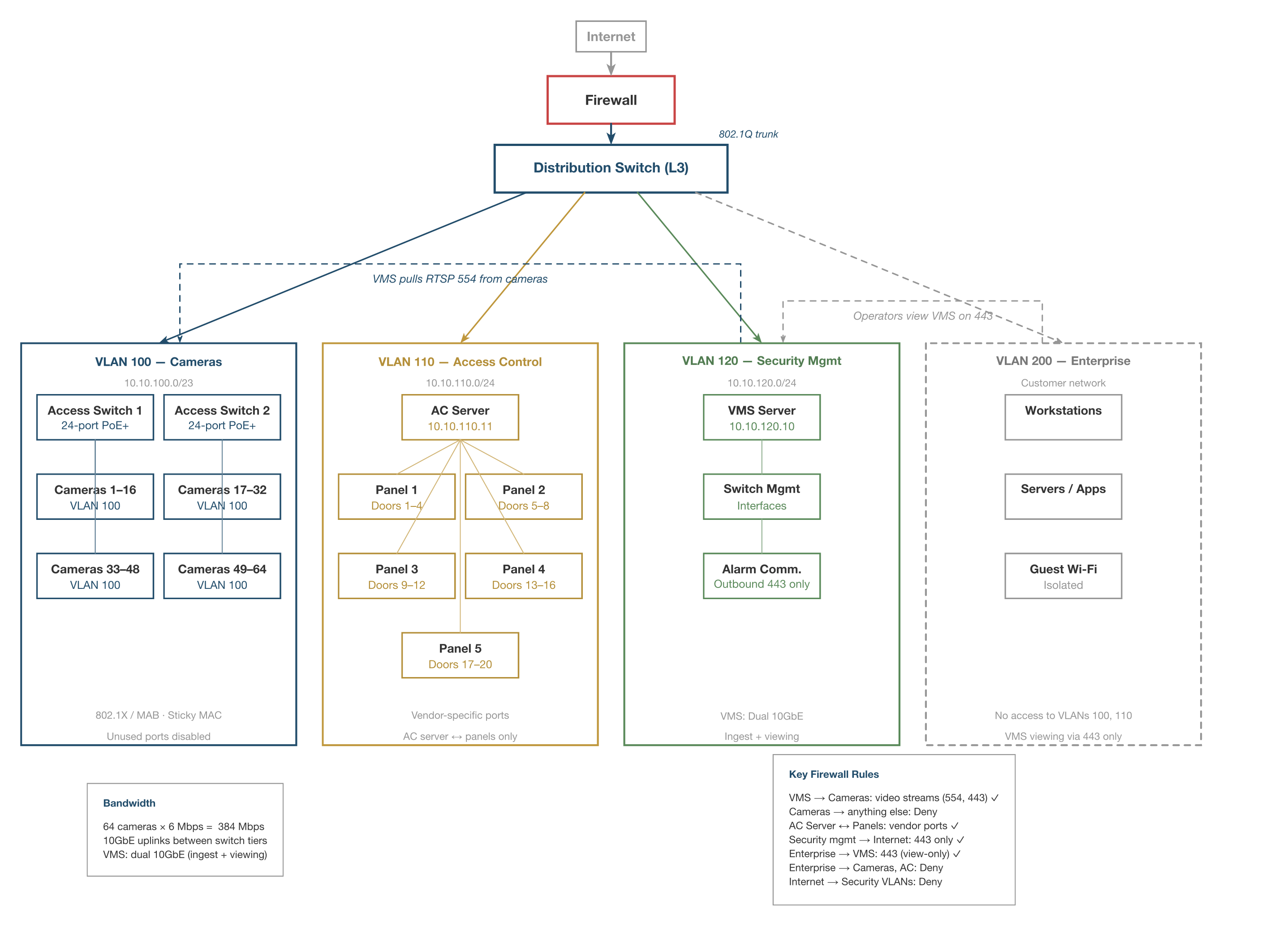
A reference network for a single-site mid-market commercial deployment — roughly 50–100 cameras, access control, and alarm — with VLAN segmentation, firewall rules, and device placement. The diagram is drawn so an integrator can use it as a starting template and modify the specifics for a given site.

Why It's Here

The most frequent request from integrators who have read early drafts is "show me what the network is supposed to look like." Appendix B is the answer. This figure is the mid-market version — the common case, the one most small commercial sites actually need.

Source appb-mid-market.png300 PPI raster appb-mid-market.typCeTZ / Typst source
Figure B.2 Appendix B · Network Reference

Enterprise Multi-Site Network Architecture

Enterprise Multi-Site Network Architecture

What It Shows

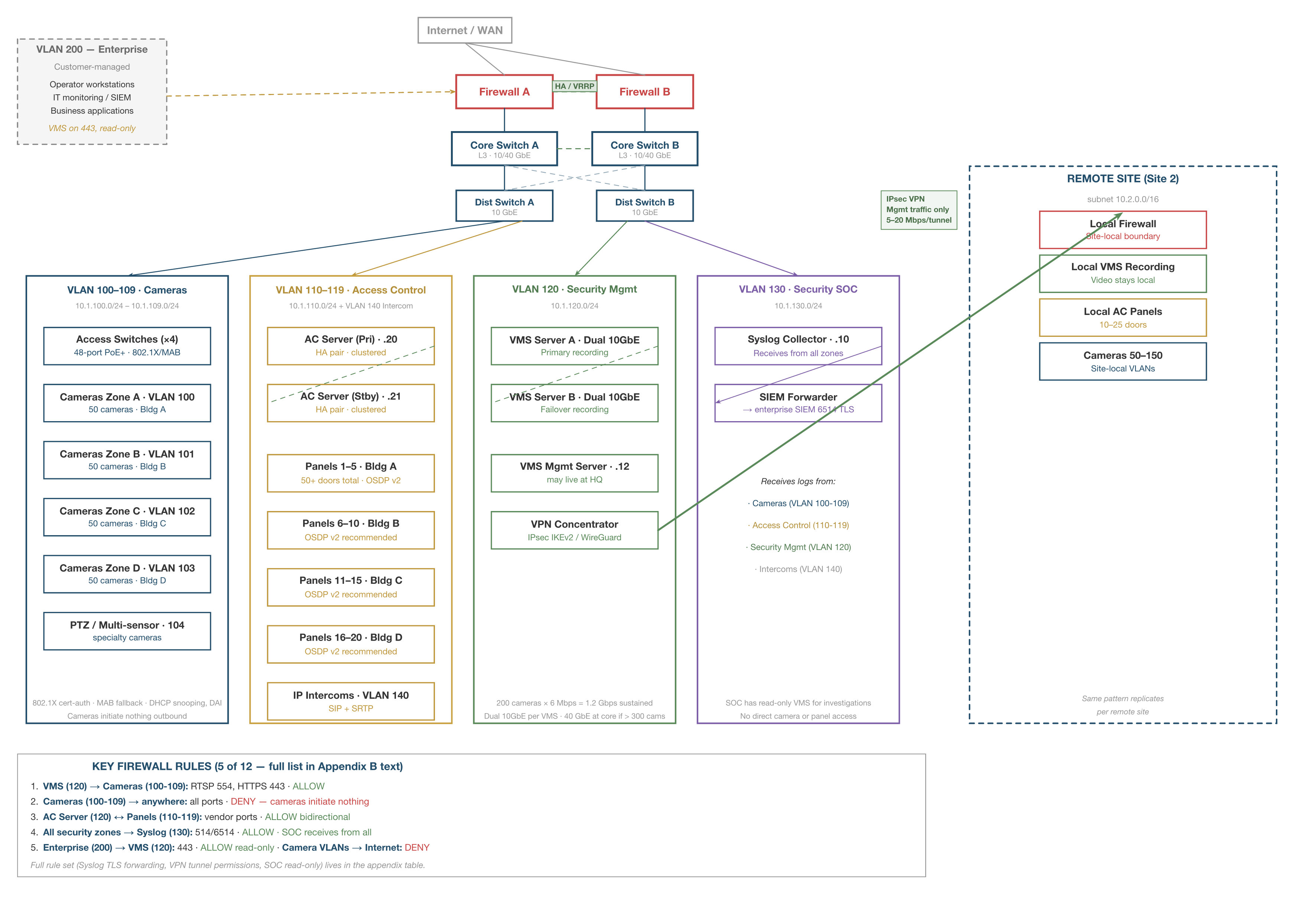
A reference architecture for enterprise deployments — 100+ cameras, 50+ doors, two or more sites. The primary site has an HA firewall pair, HA core/distribution switches, and four VLAN zones (Cameras, Access Control, Security Management, SOC/Monitoring) with Enterprise VLAN 200 on the customer side of the firewall. A remote site connects over IPsec VPN carrying management traffic only; video stays local. Five marquee firewall rules sit at the bottom as a reference.

Why It's Here

This is the diagram an integrator hands to their customer's IT department when proposing an enterprise job. It makes the trust boundaries explicit, shows where the SOC fits as a distinct concern, and settles the recurring "does video cross the VPN?" question with a visible answer (no).

Source appb-enterprise.png300 PPI raster appb-enterprise.typCeTZ / Typst source